
Espresso Machines
Breville Barista Touch Review
The guided all-in-one for households that want presets, auto milk, and ThermoJet speed in one footprint.
Quick verdict
The Breville Barista Touch is worth it when several people want consistent milk drinks from saved recipes and you prefer one appliance. If you mainly pull espresso and steam by hand, the Barista Pro is usually the smarter spend.
The Barista Touch (BES880) keeps the Pro’s fast-heat, integrated-grinder architecture and adds a color touchscreen, saved drinks, and automatic milk texturing. List price is typically around $1,000 before promotions. Our assessment is based on the machine's specifications, features, typical street pricing, manufacturer documentation, and comparison with competing models—not a Coffee Standard hands-on test.
Research fit score: 4.2/5 — based on specifications, retailer documentation, and category tradeoffs. Not a lab-test score.
Typical price: Typically around $800–$1,000; list is often near $1,000
Best For
- •Households that want swipe-to-drink presets
- •Milk-drink drinkers who want automatic steaming as a safety net
- •People who like all-in-one machines and will pay for more guidance
Key Specifications
| Specification | Detail |
|---|---|
| Model | BES880 (Barista Touch) |
| Type | Semi-automatic with touchscreen, auto milk, integrated grinder |
| Heating | ThermoJet; manufacturer claims ~3-second heat-up |
| Grinder | Integrated conical burrs; 30 grind settings (manufacturer) |
| Portafilter | 54mm stainless; ~18g double-basket targeting |
| Milk | Auto MilQ wand plus manual texturing option |
| Saved drinks | Up to 8 personalized coffees (manufacturer) |
| Water tank | About 2 L (67 oz) |
| Dimensions (Breville US) | About 15.7 × 12.6 × 12.4 in (W×D×H); confirm clearance for hopper |
| Warranty (US, typical) | 2-year limited household; confirm current terms |
Product Overview
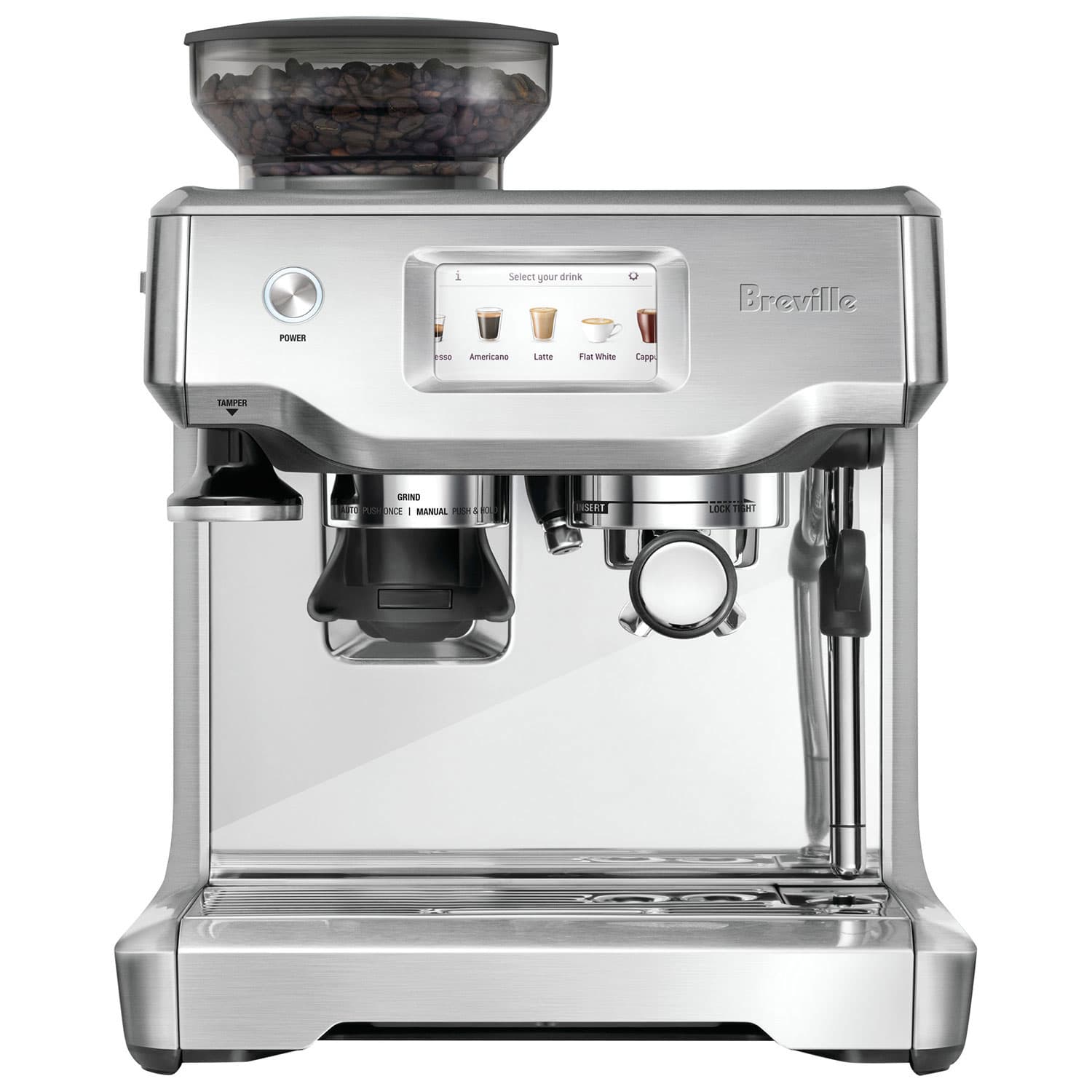
Breville Barista Touch
Often near $1,000 before sales
- Best for:
- Guided milk drinks in one footprint
- Typical price:
- Often near $1,000 before sales
All-in-one espresso machine with color touchscreen drink menu, automatic milk texturing, and an integrated conical grinder. Positioned above the Barista Pro for guided household use.
Feature set and manufacturer documentation make it the Breville all-in-one for people who want appliance-like recipes without a full super-automatic.
Key strengths
- +Saved drink profiles for mixed households
- +Automatic milk plus a manual path
- +Fast ThermoJet readiness
- +Complete kit including dosing funnel accessories
Things to consider
- −Usually the expensive way to get an integrated grinder
- −Touchscreen is extra complexity if unused
- −Same 54mm / built-in grinder ceiling as siblings
- −Larger purchase than a compact machine plus entry grinder
Key features
- •Color touchscreen
- •Auto milk texturing
- •Integrated conical grinder
- •ThermoJet heating
- •Up to 8 saved drinks
Features
Breville’s US spec sheet highlights ThermoJet heat, 30 grind settings, Auto MilQ temperature and texture levels, a 54mm portafilter, and accessories such as a dosing funnel, Razor dose tool, and water filter. The Touch is an appliance with espresso bones, not a café group head in disguise.
Espresso workflow
Day-to-day use is swipe a drink, confirm grind/dose prompts, and let the machine sequence shot and milk more than a fully manual Pro. You still grind fresh and lock in a portafilter—this is not Nespresso.
For home-use roundups, see best espresso machines for home use and the espresso machine buying guide.
Grinder performance
Same class of integrated conical grinder as other Barista-series machines: convenient, adequate for many milk drinks, and the part enthusiasts replace first in spirit (even when they cannot physically swap it). If grind quality is the priority, do not buy the Touch to “get a better grinder”—buy a separate one.
Milk steaming
Automatic milk is the Touch’s clearest advantage over the Pro. Temperature and texture presets help beginners and guests. You can still steam manually. If milk drinks are rare, you are paying for a feature you will ignore.
Ease of use, cleaning, and size
The touchscreen lowers decision load and adds surfaces to keep clean. Descale, backflush, and wand wipe still apply. Footprint is a full Barista-series station—plan hopper height and tank removal, not just width.
Final verdict
Choose the Touch when guided drinks and auto milk will be used every week. Choose the Barista Pro when control and price matter more. Compare them directly in Barista Pro vs Barista Touch.
Who Should Buy It?
- •Multiple drinkers with different default drinks
- •You want auto milk without moving to a super-automatic
- •Counter space for one wide station is easier than two devices
Who Shouldn't?
- −You will not use the touchscreen or saved profiles
- −You want maximum control per dollar—choose the Pro
- −You already have a separate espresso grinder
- −You need the smallest possible chassis
Alternatives
Alternative: Breville Barista Pro
- Best for:
- Hands-on all-in-one buyers
Keep fast heat and the built-in grinder without paying for the touchscreen stack.
Most of the Touch’s espresso architecture at a typically lower price.
Key strengths
- +Lower typical price
- +Less menu diving
Things to consider
- −No auto milk
- −No drink library
FAQ
Is the Barista Touch worth the extra cost over the Pro?+
Only if you will use saved drinks and automatic milk. Otherwise the Pro is usually enough.
Barista Touch vs Barista Express?+
The Touch is faster to heat and more guided. The Express is the budget all-in-one. Most shoppers deciding on speed and interface should also look at the Pro in between.
Can the Barista Touch make good espresso?+
Yes for typical home milk drinks when grind and dose are set for the beans. It is not a replacement for a dedicated grinder plus a 58mm prosumer machine.
Does it need a separate grinder?+
Not to start. Adding one later is awkward because you already paid for a built-in unit.
Related Coffee Standard Guides
Comparisons
Breville Barista Pro vs Barista Touch: Which Should You Buy?
Manual-guided control versus touchscreen recipes for Breville’s upper all-in-one tier.
Updated August 7, 2026 · 7 min read
Espresso Machines
Breville Barista Pro Review
A faster all-in-one than the Barista Express—for people who want an integrated grinder and more control than a fully automatic, without high-end gear.
Updated August 13, 2026 · 11 min read

Guides
Espresso Machine Buying Guide
A practical framework for choosing your first or next espresso machine.
Updated August 1, 2026 · 12 min read
Espresso Machines
Best Espresso Machines for Home Use
Home espresso machines chosen for daily life, not café production schedules.
Updated August 1, 2026 · 9 min read
Coffee Setups
Best Coffee Setup for Latte Drinkers
Build around steam power, consistency, and a weekday milk routine—not just straight espresso.
Updated August 7, 2026 · 8 min read
Espresso Machines
Should You Buy an Espresso Machine With a Built-In Grinder?
A direct answer to the built-in vs separate grinder decision—convenience, taste, upgrades, and who should buy which.
Updated August 13, 2026 · 8 min read